The Post
I have created some code with examples to complement GCP - GKE How to - ACM. I was specifically looking into using this for Atlantis, but it’s still a pretty good example of using ACM with repo sync and OCI artifact sync.
⚠️ Atlantis post is WIP right now.
Sync to Git Repository
The Repository to be Synced
The code is available here: repository with yamls to sync to cluster. Key things are:
- The folder structure which is explained here: GCP - GKE How to - ACM.
- The kustomize workflow that will render base + overlays.
- I didnt add auth for this - but in the next example I cover it with Workload Identity Federation.
- Another option for auth is just using a key manually created (or created in your tf file) for the service account and put it into a secret variable in the repo or create a GitHub App… however, wherever possible, use WIF (workload identity federation (example on how to use in the Sync to OCI Artifact section)).
Creating the Infra and Syncing to Repository
The code for the infra is available here: Terraform for Repository sync. The key things, besides VPC, Cluster, etc is actually around fleet and fleet membership.
Every cluster has one membership. This is pretty much saying “this cluster can use features from the gke hub”. Creating the membership:
resource "google_gke_hub_membership" "membership" {
  membership_id = var.cluster_name
  endpoint {
    gke_cluster {
      resource_link = "//container.googleapis.com/projects/${var.project_id}/locations/${var.cluster_region}/clusters/${google_container_cluster.autopilot.name}"
    }
  }
}
Independent of the above we enable “configmanagement” feature in the gke hub:
resource "google_gke_hub_feature" "configmanagement" {
  name     = "configmanagement"
  location = "global"
}
Right now we have a cluster with a membership to the gke hub and the config management feature enabled in the hub. Now, we “install/configure” the feature in the cluster with a google_gke_hub_feature_membership:
resource "google_gke_hub_feature_membership" "configmanagement" {
  feature    = google_gke_hub_feature.configmanagement.name
  membership = google_gke_hub_membership.membership.name
  location   = "global"

  configmanagement {
    config_sync {
      source_format = "unstructured"
      enabled = true
      git {
        sync_repo   = var.config_sync_repo_url
        sync_branch = var.config_sync_branch
        policy_dir  = "rendered/${var.cluster_name}"
        secret_type = "none"
      }
    }
  }
}
A few discussion can happen around using source_format = "unstructured" or not. Take a look at these links to understand this better:
- hierarchical: hierarchical repo
- unstructured: unstructured repo
After properly configuring the variables, running tf init and tf apply you should have a cluster that is syncing to folder rendered/ in the repo you have configured for config_sync_repo_url variable.
Deploying Changes to the Cluster
Deploy
Making changes in this setup is very simple:
- You create a PR in repository with yamls to sync to cluster - example PR: changing deployment name.
- The workflow for kustomize will run and render your changes automatically.
- I have a ruleset configured in the repo to require that workflow to run (the workflow is the only that should be changing what is in the
rendered/folder).
- I have a ruleset configured in the repo to require that workflow to run (the workflow is the only that should be changing what is in the
- Review the PR - Approve the PR - Merge the PR.
- Go take a look at your cluster - the changes should be there in a few secs (you can configure the pull frequency; default is around 15s).
Sync to OCI Artifact
This example is a bit different because I decided to use
project factory- the reason for that is because when configuring WIF in a GCP project the WIF deletion is actually a soft delete.. so if you try to create a WIF pool with the same name as one you created/deleted, it will fail - you have toundeleteit instead (I put a comment in the code explaining how to do it - but you dont need to worry about that now because we are using brand new projects every time now).
The Repository to be Synced
The code is available here: repository with yamls to sync to cluster. Key things are:
- The folder structure which is explained here: GCP - GKE How to - ACM.
- The build OCI workflow that will build the artifact and push to artifact registry.
- Deploying/Changing the image being synced to the cluster:
- I created a deploy OCI workflow that can patch root-reconciler with the given image but as you can see.. the file is not under workflows - I’m not using it because the image we declare in terraform (in the
sync_repovariable) will get out of date.. we could.. maybe.. not have an image there and manage the versions with only GitHub Actions - it always depends on what works for the team but, for me, now, I would rather manage the version of the image being synced in the terraform file… - To deploy a new image to the cluster we actually just update the
sync_repovariable ingoogle_gke_hub_feature_membership.
- I created a deploy OCI workflow that can patch root-reconciler with the given image but as you can see.. the file is not under workflows - I’m not using it because the image we declare in terraform (in the
Creating the Infra and Syncing to OCI Artifact
The code for the infra is available here: Terraform for Repository sync. The infra here has a few more resources because we need:
- Service Accounts to be able to push to artifact registry
- A SA that will patch the deployment in a given cluster with the version of OCI artifact we want to have synced to the cluster.
- We could’ve given
cluster.viewer+ in cluster RBAC for least privilege but we gavecontainer.developerto simplify.
- We could’ve given
- WIF to auth to GitHub
- Which allows the workflows in the repo to -> GCP SAs (for container push and patch rootsync actions).
- An Artifact Registry (AR) repository - which will hold the OCI images.
Building and Deploying Changes to the Cluster
Build
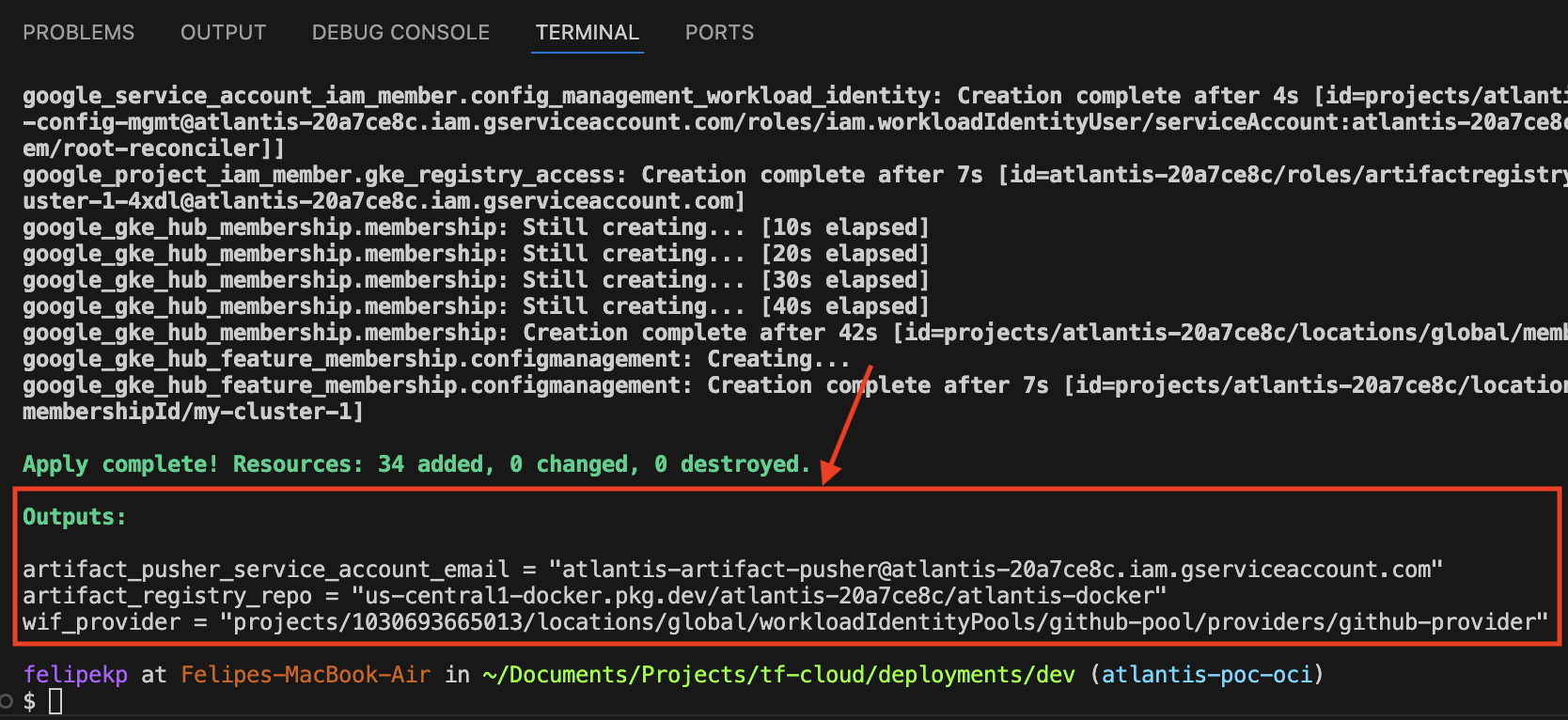
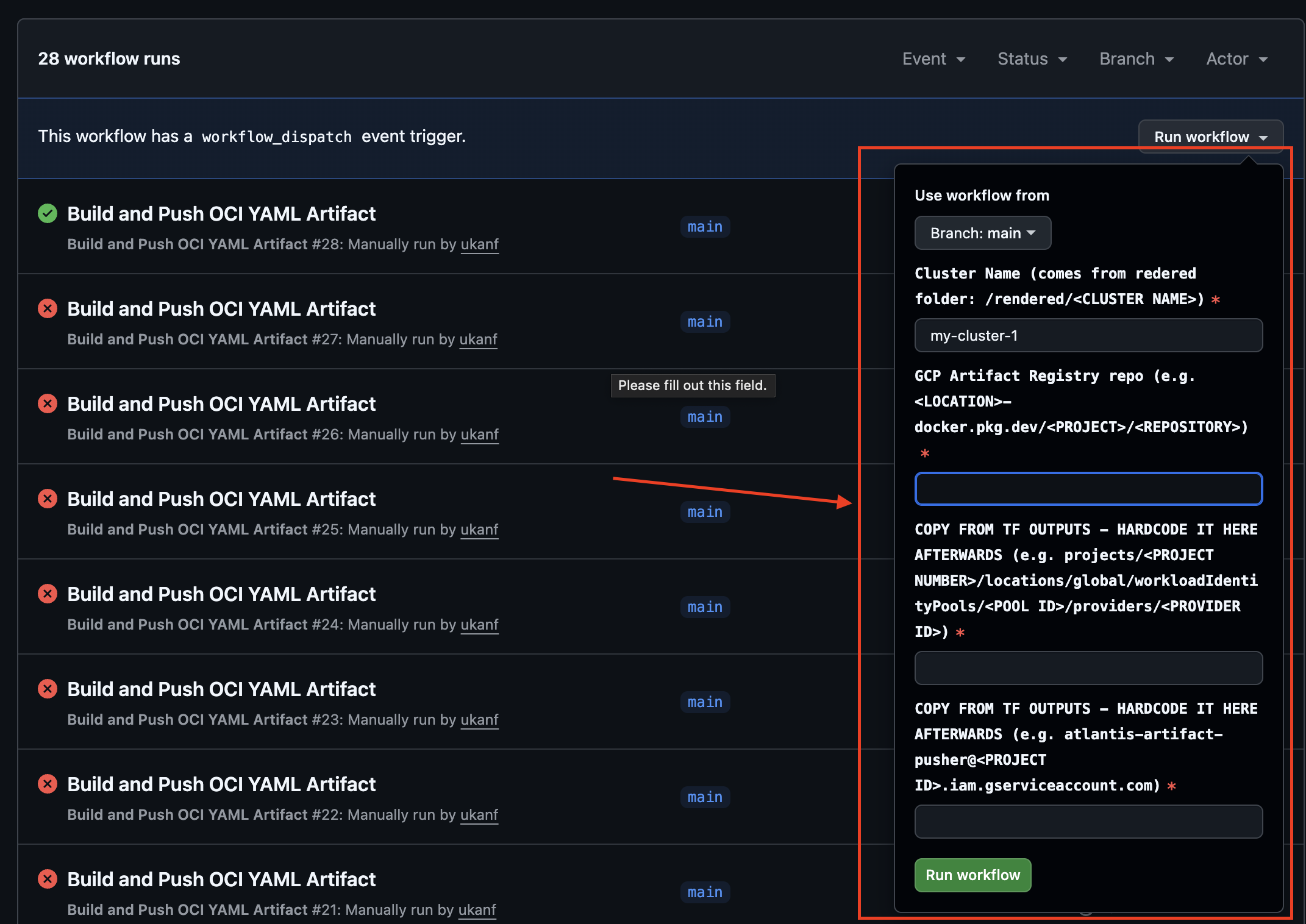
Simply run the workflow with the values outputted from terraform apply from the previous step…
Example apply output:
Running the workflow:
Images that were built in the artifact registry:
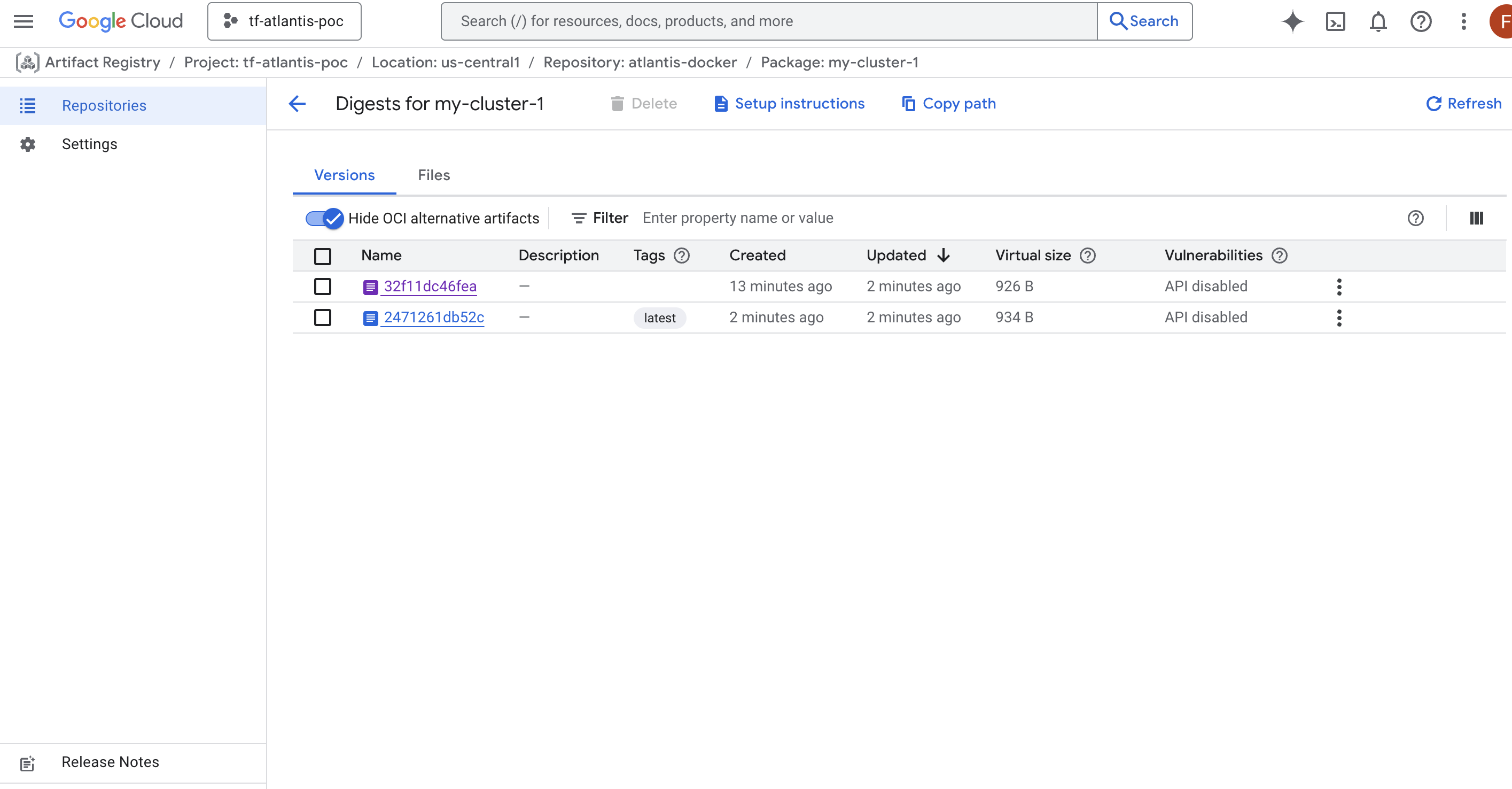
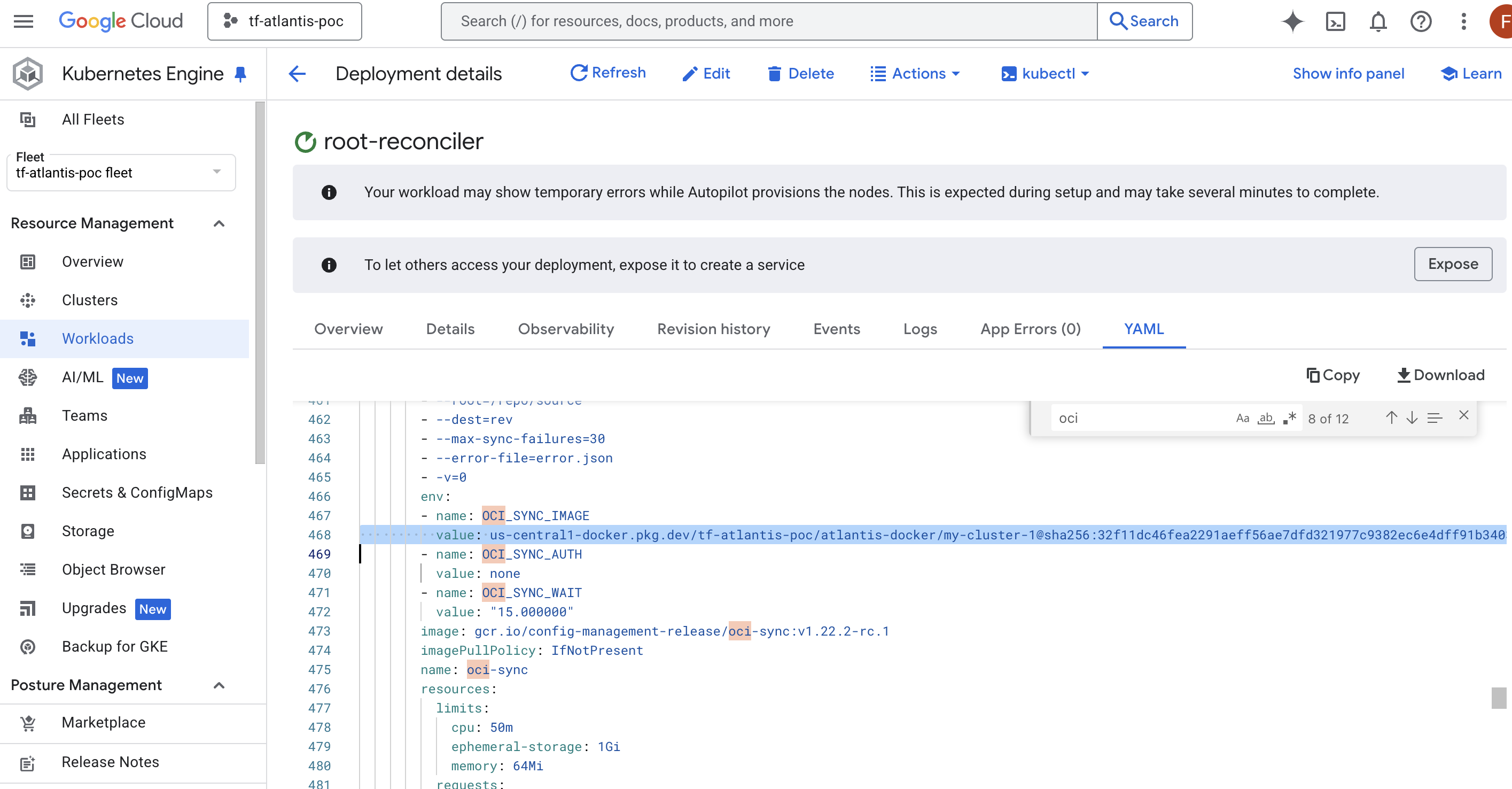
Image being deployed in the cluster (example):
Deploy
Making changes in this setup involves more steps.. and because of the additional options we get from the extra steps it can be more complex (?).
It’s very similar to Deploying Changes to the Cluster except step 4…
- You create a PR in repository with yamls to sync to cluster - example PR: changing deployment name.
- The workflow for kustomize will run and render your changes automatically.
- I have a ruleset configured in the repo to require that workflow to run (the workflow is the only that should be changing what is in the
rendered/folder).
- I have a ruleset configured in the repo to require that workflow to run (the workflow is the only that should be changing what is in the
- Review the PR - Approve the PR - Merge the PR.
- After manually running the OCI build, go to your terraform file and update the image in
sync_repo- it’s undergoogle_gke_hub_feature_membership.- Right now I kept it manual.. but, OCI build could be triggered every time we merge to main, for example.
Summary
Repository with the GitHub Actions and where the yamls for the clusters reside:
For the infra we have the two options:
- Infra for Repo sync:
- (Recommended) Infra for OCI Artifact Sync: