TLDR;
If you want something simple which works well and only applies the difference, go with Git Repository Sync; if you want something more flexible, and that offers the possibility to use Binary Auth, for example, go with OCI Artifacts.
In both scenarios teams can individually manage the lifecycle of what gets synced. OCI Artifacts are usually a better choice for a bigger number of teams and Repository Sync works well for smaller/less teams and/or lower environments.
The Post
Here are a few options on how to use ACM to sync repos or artifacts to a GKE cluster.
| Sync Option | Description | Authentication Support |
|---|---|---|
| Git Repository | Sync configs from a Git repository (GitHub, GitLab, Bitbucket, etc.) | SSH, HTTPS with token/password, GCP IAM |
| OCI Artifact (Image) | Sync from an OCI image (container registry like Artifact Registry) | GCP Workload Identity, image pull secrets |
There are two other options which I’m not covering here: syncing to a GCS bucket and syncing to helm charts. Honestly, syncing to helm charts might get superseded by OCI artifact in most cases and syncing to a bucket doesn’t feel like a full solution because if yaml files make into a bucket why are they not being version controlled using Git?
Repository Structure (kustomize)
Refresh your knowledge in kustomize and take a look at this suggested repo structure:
acm/
└── root-sync/
    ├── base/
    │   ├── cluster/
    │   │   ├── clusterrole.yaml
    │   │   ├── namespace-team-a.yaml
    │   │   ├── namespace-team-b.yaml
    │   │   └── kustomization.yaml
    │   └── kustomization.yaml
    ├── overlays/
    │   ├── us-east4-dev/
    │   │   ├── kustomization.yaml
    │   │   └── patch-clusterrole.yaml
    │   ├── us-east4-staging/
    │   │   ├── kustomization.yaml
    │   │   └── patch-clusterrole.yaml
    │   ├── us-east4-prod/
    │   │   ├── kustomization.yaml
    │   │   └── patch-clusterrole.yaml
    │   ├── europe-west1-dev
    │   │   ├── kustomization.yaml
    │   │   └── patch-clusterrole.yaml
    │   ├── europe-west1-staging/
    │   │   ├── kustomization.yaml
    │   │   └── patch-clusterrole.yaml
    │   └── europe-west1-prod/
    │       ├── kustomization.yaml
    │       └── patch-clusterrole.yaml
    └── rendered/
        ├── us-east4-dev/
        ├── us-east4-staging/
        └── us-east4-prod/
        ├── europe-west1-dev/
        ├── europe-west1-staging/
        └── europe-west1-prod/
- base: is where the yamls that are common across the clusters go (for consistency).
- overlays: is where we overwrite values from base or where we add things to specific clusters (for flexibility).
- rendered: is where kustomize outputs base + overlays.
My suggestion is to simply have rendered folders for each cluster in every environment and when calling oras push push each one of the rendered folders individually as a separate OCI Artifact OR sync each of the clusters to the folder path for that specific cluster if you are Syncing to a Git Repository.
Sync to Git Repository
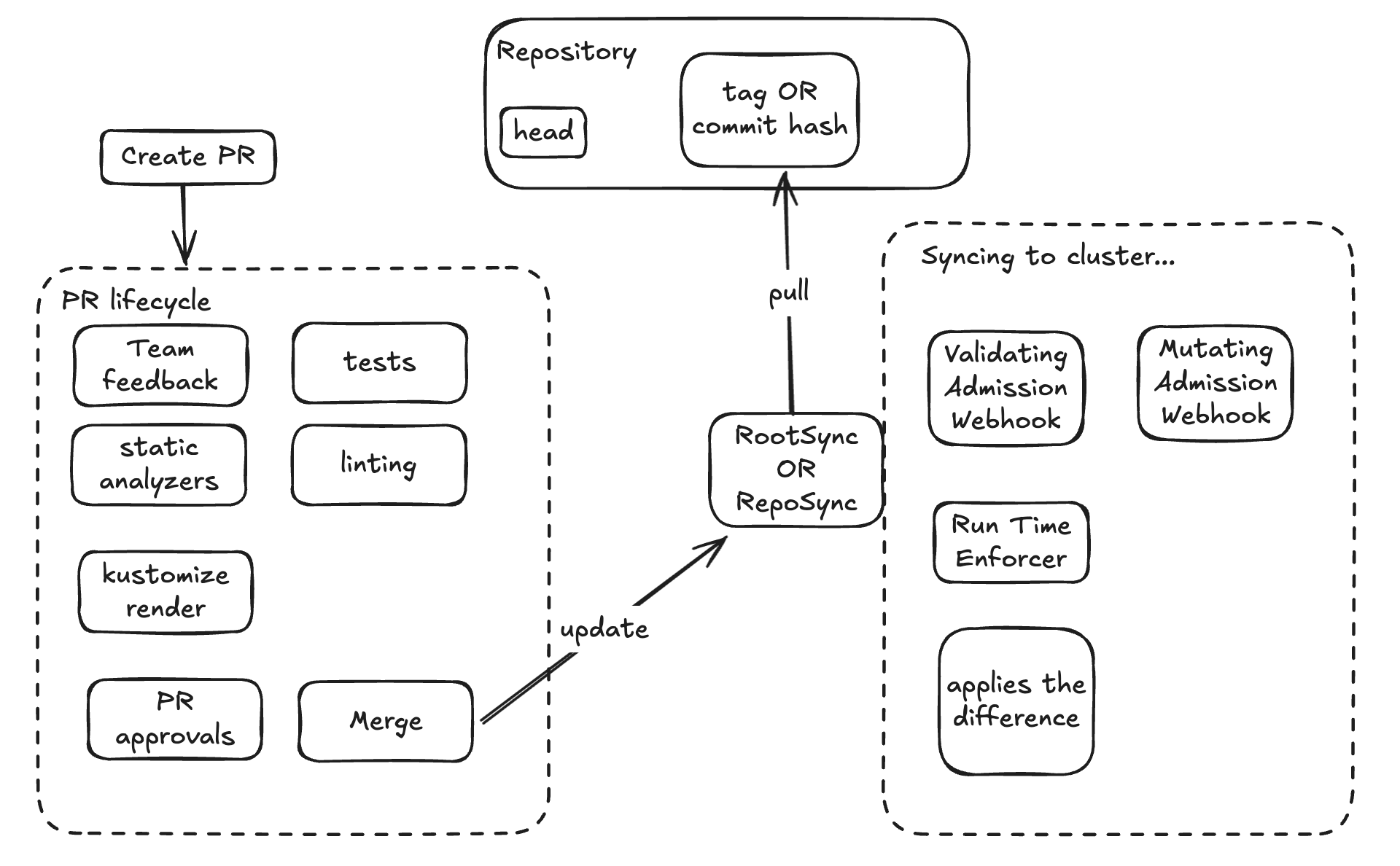
Syncing to a Git Repository can be a good fit if you want a simpler pipeline. One thing you must consider here is that we can:
- Sync a repo for the entire cluster (use only RootSync).
- Sync individual namespaces (use RootSync and RepoSync).
The above doesn’t actually change how we do the git sync but what changes is how the cluster is tracking the changes in that repository. I have seem 3 different ways to sync to the repo:
- branch (head in that branch)
- commit hash
- tag
Tag is actually the closes it gets to OCI Artifact as it’s more “static”. Commit hash is equivalent to the tag approach as it’s also pretty static and both need a change in the cluster RootSync/RepoSync to sync to the new version. Syncing to the head can be very risky, but for lower environments (dev and maybe staging) it’s actually a great fit.
Syncing Cluster or ns to HEAD

Syncing Cluster or ns to Tag or Commit Hash
Sync to OCI Artifact
Here you actually need more tooling to make it work, but it might be worth it… you need to run pipelines to push your artifacts somewhere (GAR in this case) but it also opens up the possibility to use Binary Auth to sign the OCI Artifact and then attest before pulling it into your clusters.
Dealing with the OCI Artifact
Creating the OCI Artifact should look very similar to building a container image:
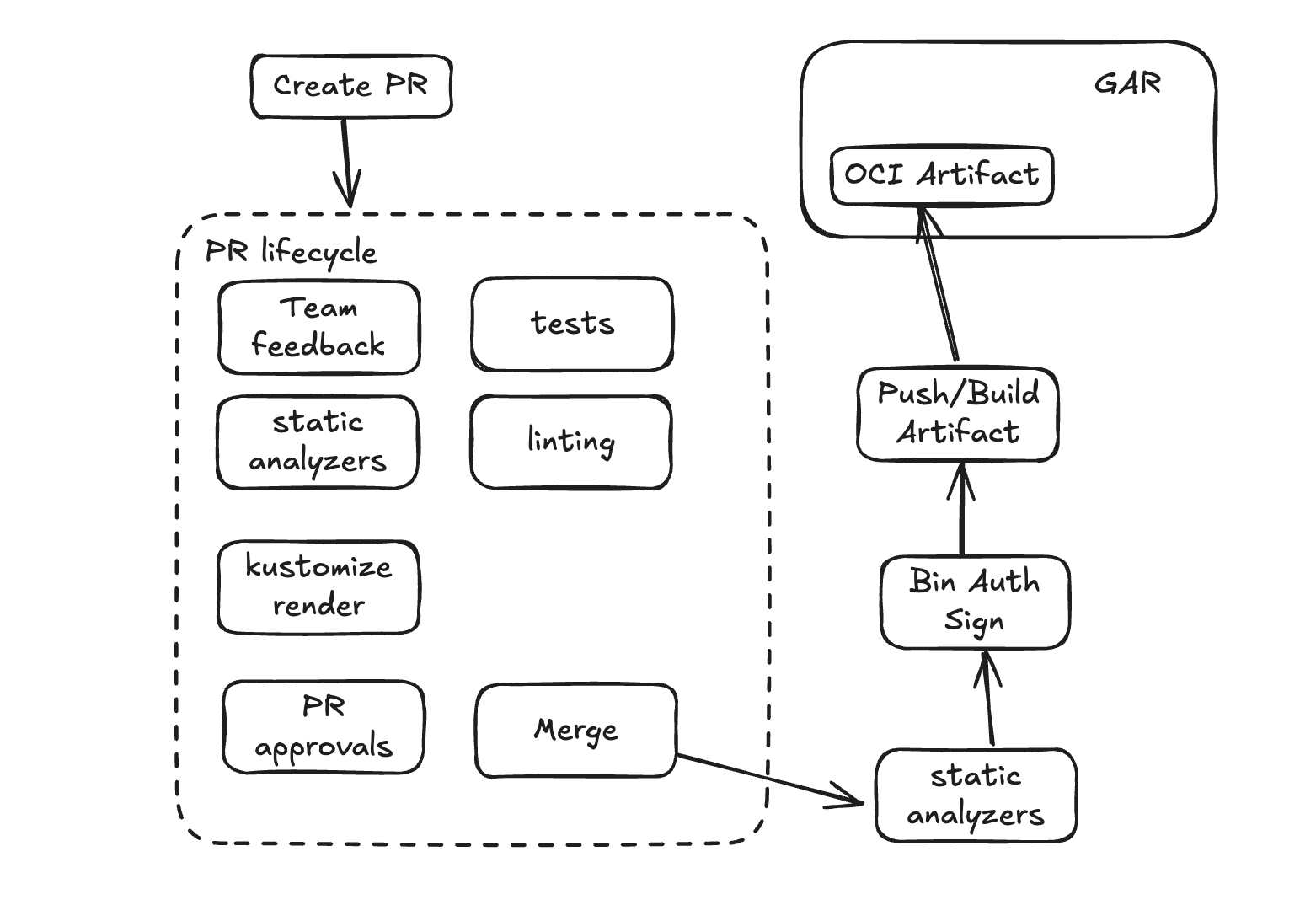
Deploying it can also be similar to it. Which might be an advantage if your team is already well versed in building images…
One thing you must consider here is that we can:
- Build one artifact for the entire cluster (use only RootSync).
- Build artifacts and sync to cluster and individual namespaces (use RootSync and RepoSync).
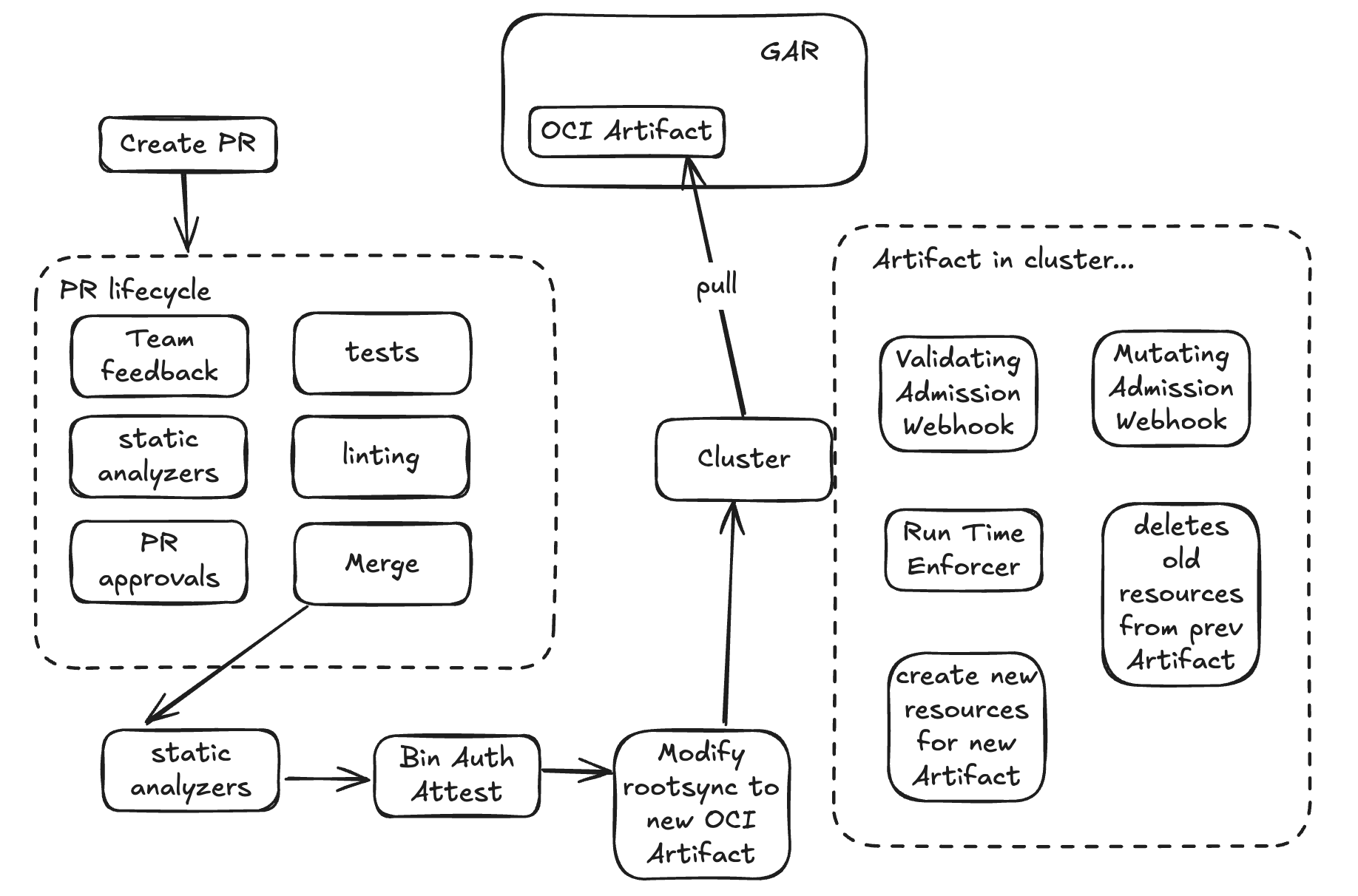
Syncing Cluster to Single OCI Artifact
ACM treats OCI artifacts as immutable snapshots, so the cluster:
- Pulls the entire artifact
- ⚠️ Deletes previously synced resources
- Applies the full new configuration set
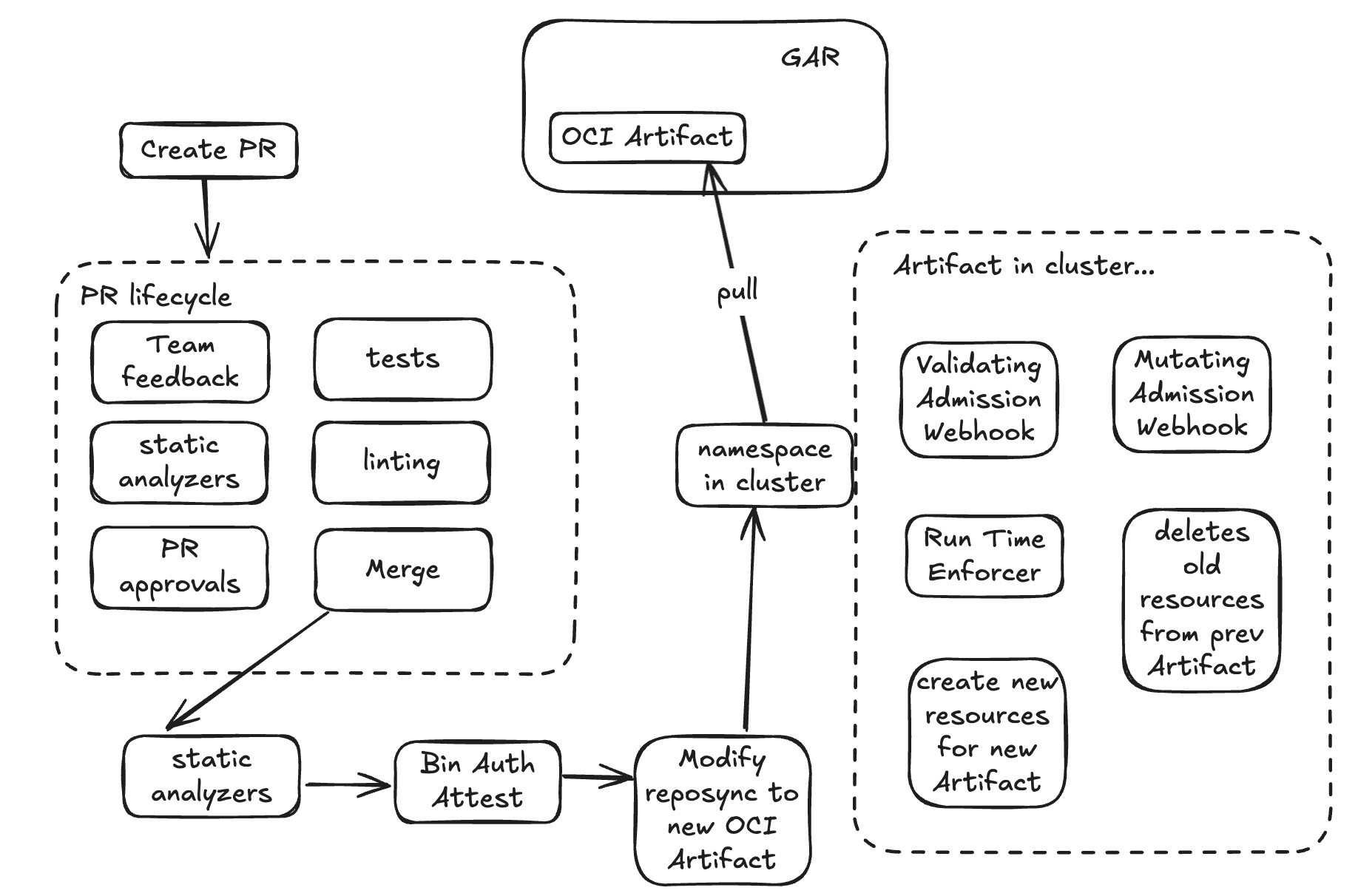
Syncing Cluster’s namespaces to OCI Artifacts
The previous example applies in this scenario as well because if you want to use RepoSync for individual namespaces you should be using RootSync for cluster wide types of resources or configurations.
Great news is that we can actually reuse what we just built for the cluster wide resources but apply it to individual namespaces (small tweaks to the pipeline to update a RepoSync instead of RootSync)
Summary
A lot of the following pros and cons are really relative. Sometimes it’s a “pro” to be immutable and some other times it isn’t. To me TLDR is: if you want something simple go with Git Repo Sync; if you want something more flexible and reusable, specially in a scenario you might want to reuse these artifacts across many clusters go with OCI Artifact.
| Aspect | OCI Artifact Sync | Git Repository Sync |
|---|---|---|
| Source of Truth | Immutable container image (e.g., stored in Artifact Registry) | Version-controlled Git repository |
| Immutability | ✅ Immutable once pushed (tagged by digest), which ensures consistent config versioning | ⚠️ Git branches/tags can change unless locked by commit hash |
| Release Promotion | ✅ Easy to promote artifacts between environments (e.g., dev → staging → prod) | ⚠️ Harder to promote Git-based releases without extra automation |
| Atomic Updates | ✅ OCI pulls entire snapshot as a single unit | ⚠️ Git sync can partially apply changes if not managed carefully |
| Binary Signing | ✅ Can sign and verify OCI artifacts | ⚠️ No native signing of Git content (though PGP commit signing exists) |
| Air-gapped Support | ✅ Better suited for air-gapped environments | ⚠️ Requires Git access; harder in isolated setups |
| Readability / Developer UX | ⚠️ Artifact is not easily human-readable; but the code to build it is | ✅ It’s code in the repository |
| Change History | ⚠️ No native diff/history without extra tooling; only the history in repo which sometimes it’s not accesible if the artifacts are just being distributed and not the repo/code | ✅ Native Git versioning, history, blame, etc. |
| Automation / GitOps Compatibility | ⚠️ We need CI to build and push image | ✅ Full GitOps flow with pull-based sync |
| Tooling Ecosystem | ⚠️ Requires OCI tooling like cosign, oras, registry access |
✅ Broad Git tooling support and integrations |
| Initial Setup Complexity | ⚠️ Requires container registry setup and CI image creation | ✅ Easier to get started with simple repo |
| Real-time Change Tracking | ⚠️ No automatic change detection unless you push new tags/digests (need CD to change the version) | ✅ Option to auto-sync when commits are made to target branch |